
Testing and debugging
You can test most of a plugin without a Matinee server: the server part with go test and matinee-plugin, and the player with matinee-plugin try. Install it in a Matinee server for a last look.
Unit tests
Section titled “Unit tests”Handlers are plain Go functions, so go test calls them directly. Package plugintest fills in what Matinee would provide:
import "github.com/yeixio/matinee/pluginsdk/plugintest"
func TestLookup(t *testing.T) {  // Answer the plugin's fetches, as if this handler were the internet.  plugintest.Network(t, http.HandlerFunc(func(w http.ResponseWriter, r *http.Request) {    fmt.Fprint(w, `{"summary": "Eat the dots.", "cover": "https://example.com/pacman.png"}`)  }))  // Collect what the plugin logs.  log := plugintest.Logs(t)
  d, err := lookup(plugin.LookupRequest{Kind: "game", Title: "Pac-Man"})  if err != nil || d.Overview != "Eat the dots." {    t.Fatalf("got %+v, %v", d, err)  }  _ = log.Lines()}
Like Matinee, plugintest.Network refuses URLs that aren’t https, and hosts your plugin.json doesn’t list under permissions.network. Keep a folder of sample files in testdata/ to index in tests. The Stories tests show the idea.
The matinee-plugin tool
Section titled “The matinee-plugin tool”go install github.com/yeixio/matinee/cmd/matinee-plugin@latestEvery command works on the plugin in the current folder, or the one you name first. Commands that run the server part run the built server.wasm in the same sandbox Matinee uses, so run matinee-plugin build after changing the code.
| Command | |
|---|---|
new <id> |
Start a plugin from a template: -name, -ext .zip,.7z, -item game, -kind |
check |
Check plugin.json and the files it names, the way Matinee does when installing |
build |
Build server.wasm with Go, check, and write <id>.matinee-plugin; -include adds files the plugin reads from its package, -o names the package |
scan <folder> |
What the plugin makes of each file in a folder |
lookup -title <title> |
Look up details for a title |
event <event.json> |
Send the plugin an event |
try <folder> |
Browse a folder and play it in a browser, as the web player would |
Commands that run the server part take -set key=value for each of the plugin’s settings, and -v to show its debug lines. The plugin’s DataDir is .matinee-dev/data in its folder.
Scan a folder
Section titled “Scan a folder”matinee-plugin scan ~/Storiesmatinee-plugin scan -lookup ~/Games # and look each one upmatinee-plugin scan -json ~/Games > scan.jsonFor each file, scan prints what the plugin filed, or skipped or its error. Under each item are the problems Matinee would have with it: a kind that isn’t the library kind’s, a poster it can’t find, facts it would leave out.
Look up and send events
Section titled “Look up and send events”matinee-plugin lookup -title "Pac-Man" -year 1980 -set apiKey=abc123echo '{"type": "playback.stopped", "item": {"id": 1, "title": "Pac-Man"}, "user": {"id": 1, "name": "Sam"}, "played": {"positionMs": 600000, "finished": true}}' | matinee-plugin event -Try the player
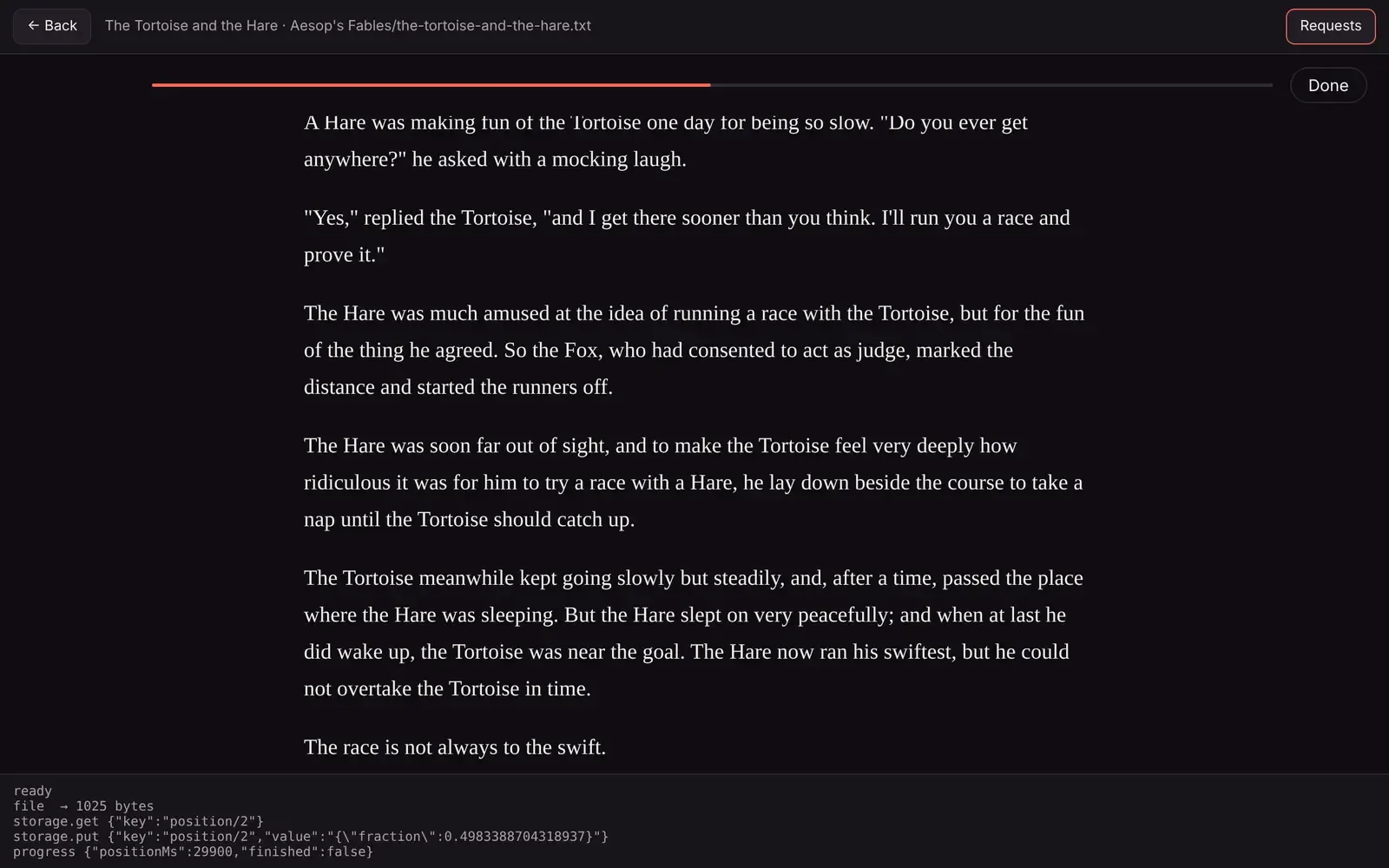
Section titled “Try the player”matinee-plugin try ~/Storiestry serves a page at http://127.0.0.1:7390 that lists what the plugin makes of the folder. Click a title to play it with your player, in the same sandboxed frame and with the same headers as the web player. The page answers the player’s requests the way the web player does:
fileandlibraryFilecome from the folder, with the same rules.- Storage is kept in
.matinee-dev/storage, one file per key, with the same key rules and limits. Delete the folder to start over. - Requests shows each request and its answer, and the terminal prints them too.
The page rescans the folder and reloads the player’s files every time, so change the player and reload, or rebuild the server part and click Rescan.
In a Matinee server
Section titled “In a Matinee server”Build the package and install it with Settings → Plugins → Add plugin → From a file. Installing a new build replaces the old one and keeps it on.
Matinee logs what plugins do with plugin=<id>. That includes your plugin.Info lines, what the plugin prints, and its errors:
docker logs matinee 2>&1 | grep plugin=storiesjournalctl -u matinee | grep plugin=storiesStart Matinee with MATINEE_DEBUG=1 to see plugin.Debug lines.
When something’s wrong
Section titled “When something’s wrong”Matinee says the server module doesn’t export matinee_handle. Build it as a reactor with the SDK: -buildmode=c-shared and GOOS=wasip1 GOARCH=wasm, which matinee-plugin build does. A plain go build makes a program with a main to run, and that won’t work.
A file isn’t in the library. Its extension isn’t in the library kind’s extensions, it’s empty, its name starts with ., or Index skipped it or failed. matinee-plugin scan shows which.
A poster doesn’t show. It must be an https:// URL, or a file in the library’s folders, the plugin’s package or its data folder. A file outside those, even one that exists, isn’t shown. scan flags it.
A fetch fails with “isn’t in the plugin’s network permissions”. Add the host to permissions.network. An admin has to turn the plugin on again to allow it.
The player is blank. Open the browser’s developer tools on the player’s frame. Usually it’s a script loaded from an absolute path (/player.js instead of player.js), localStorage (use storage instead), or a module script that failed to load. try shows the same errors.
The player never starts. Call connect() (or post ready) when the page loads. The web player sends the title only after that.