
Bring your history from another server
Moving from another media server? Matinee can read that server’s data folder and bring over what people watched, where they stopped, the collections you made and the posters you uploaded. Your films and shows stay where they are: Matinee only reads the other server’s data and never changes it.
Before you start
Section titled “Before you start”- Add your libraries in Matinee, pointing at the same folders the other server uses, and let the first scan finish. History can only be brought over for files Matinee already knows.
- Make sure Matinee’s server can read the other server’s data folder. On the same computer it already can. If the other server runs somewhere else, copy its data folder (or just its library database, see below) somewhere Matinee can see, such as a folder on your media share.
The data folder is the one that holds folders called Plug-in Support, Metadata and Media. The library database is in Plug-in Support → Databases, and its name ends in library.db.
Import
Section titled “Import”Open Settings → Libraries → Import from another media server and press Start.
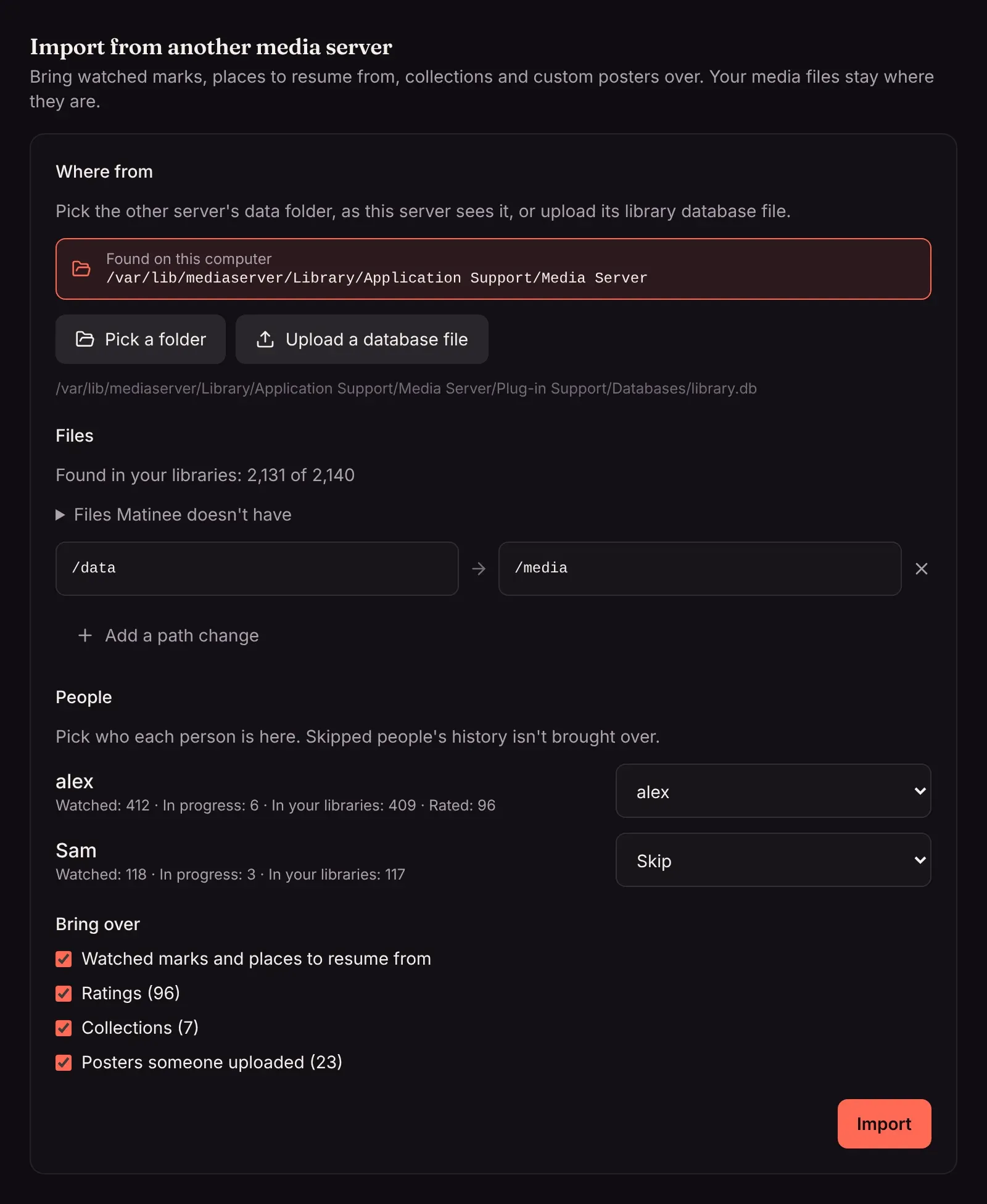
- Where from. Matinee looks in the usual places on the computer it runs on and lists any data folder it finds. Otherwise press Pick a folder and browse to the data folder, or a folder above it. You can also Upload a database file from your own computer; that brings over history and collections, but not posters, which live in the data folder beside it.
- Files. Matinee matches the other server’s files to its own by path, and says how many it found. If the two servers see the same share under different folders (say
/datathere and/mediahere, which is common with Docker), Matinee spots the difference and suggests a path change: press Use it. You can add your own changes too, then press Check again. Files Matinee doesn’t have lists a few that still don’t match, so you can see why. - People. Each person who watched on the other server is listed with how much they watched and rated. Pick who they are in Matinee: an account or a profile. Matinee suggests a match when the names are the same, and the other server’s owner goes to you. Anyone set to Skip isn’t brought over.
- Bring over. Untick anything you don’t want:
- Watched marks and places to resume from. Films and episodes you finished show as watched, and ones you stopped partway pick up where you left off, on Continue watching. Songs you played count as played, and audiobooks pick up in the right part.
- Ratings. Each person’s ratings become their own ratings here, for films, shows, seasons, episodes, albums and songs. A rating you’ve changed in Matinee since is kept.
- Collections. Each becomes a shared collection everyone can see, with the films and shows Matinee has. If a shared collection with that name already exists, the titles are added to it.
- Posters someone uploaded. Posters you uploaded by hand for a film, show, season or album replace Matinee’s. Posters the other server found online are left out, since Matinee finds its own.
- Press Import. It runs on the server, so you can leave the page; come back to see what it brought over.
Running it again
Section titled “Running it again”It’s safe to import more than once, for example after fixing a path or adding a library. Nothing is brought over twice, and a watched mark or place only replaces Matinee’s when it’s newer, so anything you’ve watched in Matinee since is kept. The summary says how many were left as they were.
Undoing a poster
Section titled “Undoing a poster”An imported poster stays through rescans, like a cover picked by hand. To go back to the automatic one, open the film or show as an admin and press Use the automatic poster.
What isn’t brought over
Section titled “What isn’t brought over”Playlists, watch lists kept online, and the other server’s accounts and passwords stay behind. People sign in to Matinee with their Matinee accounts.